

UC2 · Step 1 of 5 — Open the Activity Errors queue
Kavi Patel · Timekeeper · Tuesday, 14:08
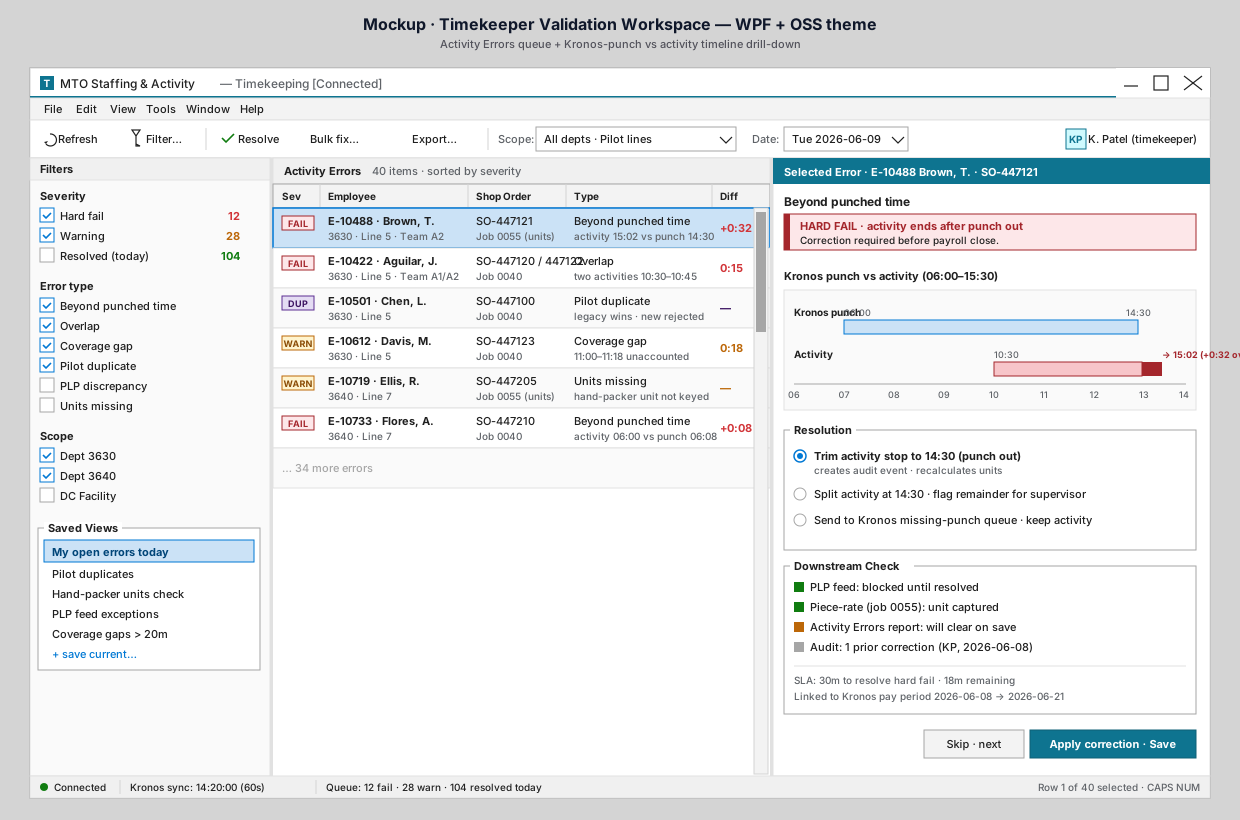
Kavi signs in and opens the Activity Errors workspace. His saved view — "My open errors today" — is selected by default.
What to notice
- Left rail · Filters. Kavi can scope the queue by severity (Hard fail, Warning, Resolved), by error type (Beyond punched time, Overlap, Coverage gap, Pilot duplicate, PLP discrepancy, Units missing), and by department. The counts next to each filter are live: 12 hard fails, 28 warnings, 104 resolved today.
- Left rail · Saved Views. Kavi's personal queues. "Pilot duplicates", "Hand-packer units check", "PLP feed exceptions", "Coverage gaps > 20m". He can save the current filter combination with one click.
- Center pane · Activity Errors grid. 40 items today, sorted by
severity. Each row carries: severity badge, employee, scope, shop order,
error type, and the diff (
+0:32,0:15, etc.). Color-coded so hard fails (redFAIL), warnings (yellowWARN), pilot duplicates (purpleDUP) and units missing all read at a glance. - Right pane · drill-down. Empty until he picks a row. Once he does, the full context lands here.
- Status bar. Bottom of the window confirms Kronos sync is current (14:20:00), queue counts match the filter (12 fail · 28 warn · 104 resolved today), and his role permissions.
What this replaces
Today, "knowing what activity errors exist" requires running multiple reports, each scoped slightly differently, and then mentally merging them. In the new app, every validation outcome from the staffing flow shows up here, in one consistent queue, with the data Kavi needs to act on it.
Why it matters
The queue is the single front door for Kavi's work. He doesn't have to choose between three reports or guess which one is current — if it's an activity error, it's here.
⬅ Use Case Index · 🏠 Demo Home · ▶ Next: Step 2 — Pick and read the timeline