

UC2 · Step 2 of 5 — Pick a hard fail and read the timeline
Kavi Patel · Timekeeper · Tuesday, 14:09
Kavi clicks the top row — E-10488 Brown, T. · SO-447121 · FAIL · Beyond punched time · +0:32. The right pane fills in instantly with the full
context.
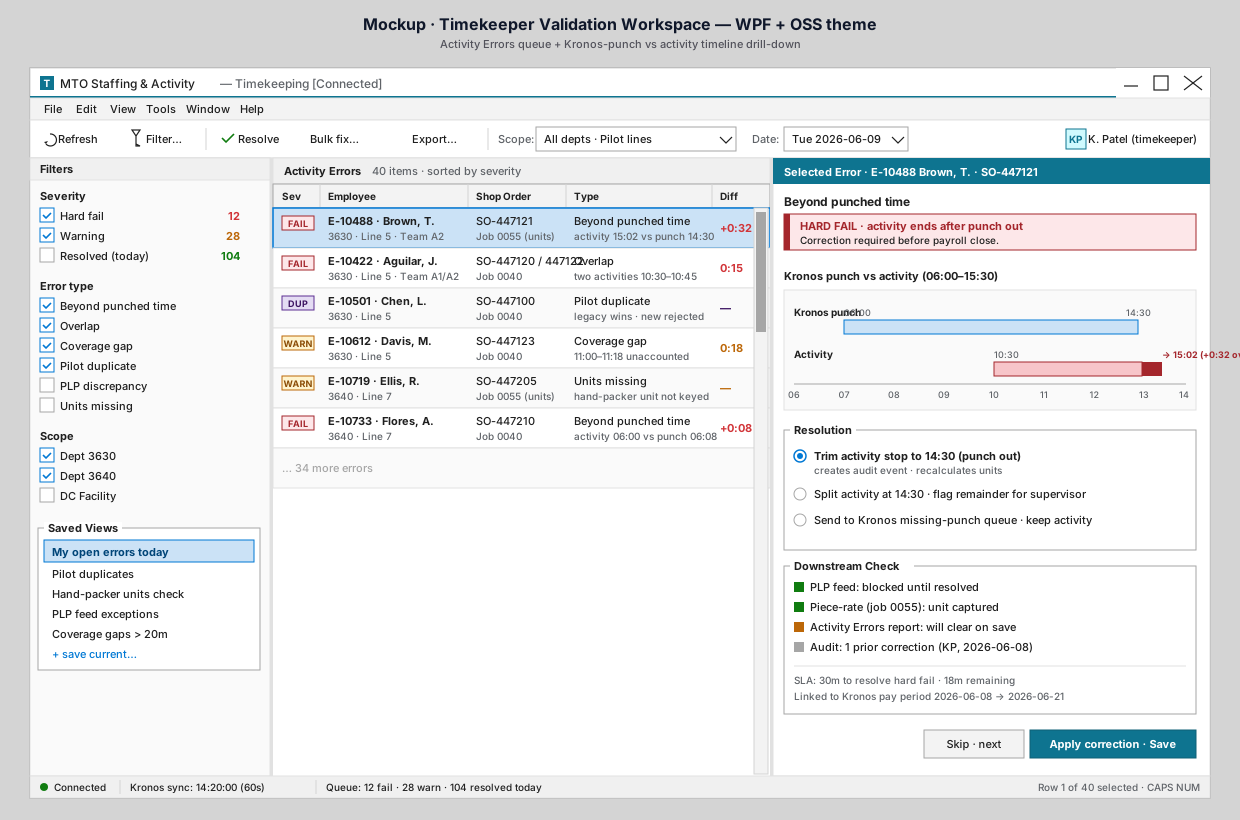
What the drill-down is telling him
Look at the right pane:
- Header.
Selected Error · E-10488 Brown, T. · SO-447121. Color band matches the timekeeping accent (teal). - Error type and severity. "Beyond punched time" — a hard fail. The red banner under the header makes the consequence explicit: "Correction required before payroll close."
- Punch vs activity timeline. Two stacked bars on a 06:00–14:00 axis:
- Kronos punch (blue): 06:00 to 14:30. This is what Kronos says — T. Brown was clocked in for that window.
- Activity (red): 10:30 to 15:02. The activity recorded by the staffing flow runs past the punch out, by 32 minutes. The portion beyond the punch (14:30 → 15:02) is shown in solid red as the over-punch.
- Resolution group. Three options Kavi can apply (we'll look at them in the next step).
- Downstream Check. Status indicators for what depends on this error being resolved: PLP feed (blocked until resolved), piece-rate continuity (unit captured — fine), Activity Errors report (will clear on save), audit trail (one prior correction by KP on 2026-06-08).
- Bottom right. The 30-minute SLA for a hard fail; 18 minutes remaining. Linked to the current Kronos pay period.
What this replaces
Today, to figure out "did the activity run past the punch?" Kavi would have to pull the punch report for that employee, the staffing sheet for that shop order, and reconcile them in his head — and the punch report might not be current. The timeline collapses that whole investigation into one picture.
Why it matters
The most expensive part of timekeeping work isn't the fix. It's the figuring out what really happened. The timeline removes that step entirely. Once Kavi can see the gap, the fix is the easy part.
⬅ Prev: Step 1 — Open the queue · Use Case Index · 🏠 Demo Home · ▶ Next: Step 3 — Choose a fix