

UC5 · Step 2 of 3 — Capture the count at end of activity
Maria Rivera · Staffing Clerk · Dept 3630 / Line 5 · Tuesday, 10:30
The hand-pack run on SO-447121 finishes. Maria reopens the assignment for that order and enters the case count.
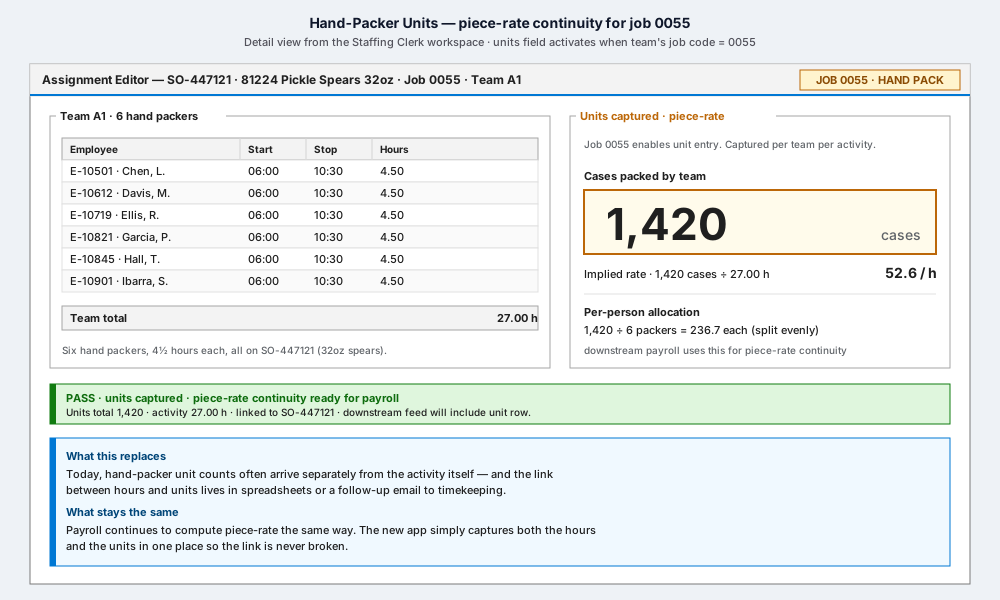
What's on screen
- Left · Team A1 · 6 hand packers. The DataGrid shows the six packers who worked 06:00–10:30, with their 4.50 hours each. Team total: 27.00 hours.
- Right · Units captured · piece-rate. The amber-bordered field invites
the count. Maria enters
1,420— the number of cases the team packed. - Implied rate · 52.6 cases / hour. The app derives this from
1,420 ÷ 27.00and shows it for sanity-check ("is that plausible for this product?"). - Per-person allocation · 236.7 each. Split evenly across the six packers — same rule the business uses today.
- Validation strip (green) · PASS. Units captured, piece-rate continuity ready for payroll. Downstream feed will include the unit row.
What Maria does not do
- Send a separate spreadsheet to timekeeping. The count is part of the same record as the hours.
- Try to remember which packer worked which fraction of the time. The allocation rule is consistent and automatic.
- Worry about the format. The field is a single number with a clear label ("cases packed by team").
What the implied rate is for
It's a plausibility check, not a constraint. If the implied rate looks wildly off (say, 5/h or 500/h for this product), Maria sees it immediately and can correct before saving. The app doesn't reject — it shows the math and lets her decide.
What saves with the activity
When she clicks Save:
- The 27.00 team-hours and the 1,420 units are written atomically — they are part of the same activity record. They cannot drift apart.
- The audit event records both.
- The downstream PLP feed includes the unit row.
- Payroll's piece-rate calculation uses the same numbers the supervisor and the timekeeper see.
⬅ Prev: Step 1 — Units field lights up · Use Case Index · 🏠 Demo Home · ▶ Next: Step 3 — Recap