

UC3 · Step 3 of 5 — Spot a problem line
Jaspreet Singh · Production Supervisor · Dept 3630 · Tuesday, 14:22
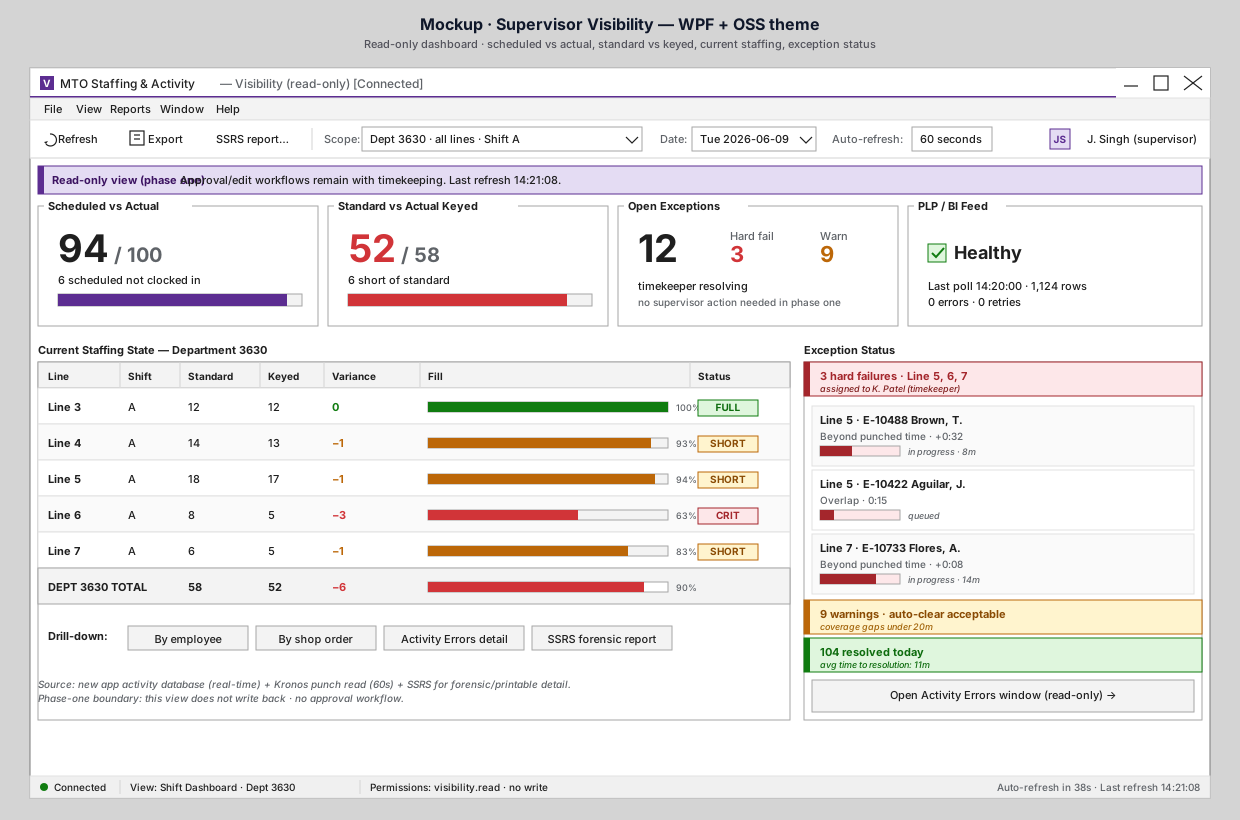
The KPI tiles told Jaspreet that Dept 3630 is short by 6. The Current Staffing State table below tells him where.
What the table tells him
| Line | Standard | Keyed | Variance | Fill | Status |
|---|---|---|---|---|---|
| Line 3 | 12 | 12 | 0 | 100% | 🟢 FULL |
| Line 4 | 14 | 13 | −1 | 93% | 🟡 SHORT |
| Line 5 | 18 | 17 | −1 | 94% | 🟡 SHORT |
| Line 6 | 8 | 5 | −3 | 63% | 🔴 CRIT |
| Line 7 | 6 | 5 | −1 | 83% | 🟡 SHORT |
| Total | 58 | 52 | −6 | 90% |
The visual variance bars make the answer obvious: Line 6 is the problem. It's at 63% fill versus standard, which is a CRIT-level short. The others are nips and tucks; Line 6 is structural.
What Jaspreet does next
He has options:
- Walk to Line 6. It's the supervisor's traditional first move and it's still right. He knows the names of the missing staff, knows whether Line 6 ran short yesterday, and knows what to ask.
- Drill down by employee. Click
By employeeunder the table to see which employees are missing on Line 6 — call-outs vs late arrivals vs pulled to another line. - Drill down by shop order. Click
By shop orderto see which shop orders on Line 6 are exposed — maybe one of them can absorb the short. - Open the SSRS forensic report. For end-of-shift documentation, the parameterized report-server view is still the right tool. The dashboard hands off cleanly.
He doesn't have to choose only one — but importantly, the first move is already informed.
What this replaces
Today, "Line 6 is short" surfaces via:
- Maria (or another staffing clerk) telling him in passing.
- A noticeable gap in production output 30+ minutes later.
- A report he pulls after lunch.
By that point the fix is harder. The dashboard surfaces it in real time, so the response can be in real time.
Why it matters
The dashboard isn't a replacement for walking the floor. It's a guide for which part of the floor to walk first.
⬅ Prev: Step 2 — Read the KPIs · Use Case Index · 🏠 Demo Home · ▶ Next: Step 4 — See who's handling it