

UC3 · Step 4 of 5 — See who's handling it
Jaspreet Singh · Production Supervisor · Dept 3630 · Tuesday, 14:23
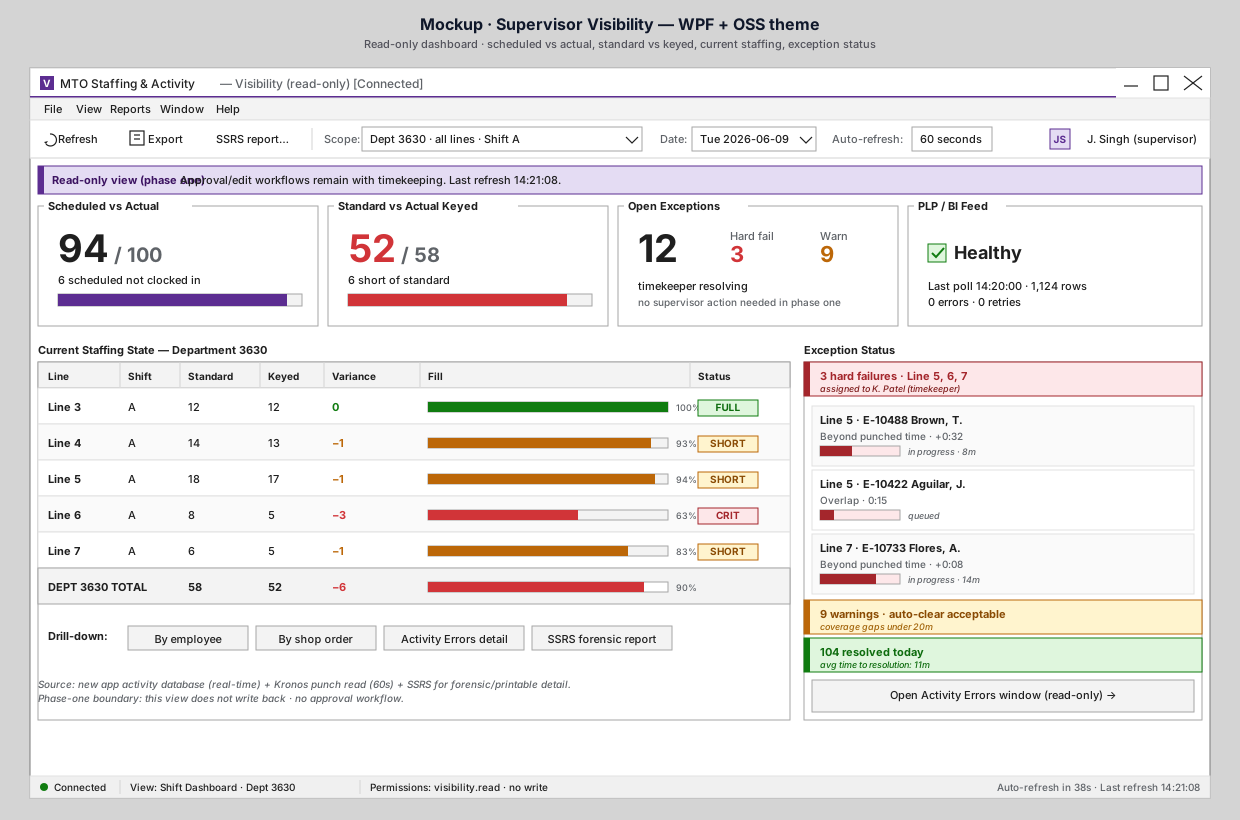
Jaspreet glances at the Exception Status panel on the right. Before he calls anyone, he wants to know what's already in motion.
What the exception status tells him
- 🔴 3 hard failures · Line 5, 6, 7 · assigned to K. Patel (timekeeper). Kavi is already working them. Jaspreet doesn't need to escalate.
- Each hard fail row shows the employee, the issue, the elapsed time ("in progress · 8m", "queued", "in progress · 14m"), and a small bar showing position toward the 30-minute SLA.
- 🟡 9 warnings · auto-clear acceptable. Coverage gaps under 20m. Jaspreet's mental model: these don't need supervisor attention; they resolve themselves or get reviewed at end of shift.
- 🟢 104 resolved today · avg time to resolution: 11m. Timekeeping is on top of things. The historical context tells Jaspreet whether today is normal or unusual.
What this gives him
| Question Jaspreet has | Answer the panel gives |
|---|---|
| Is anyone working on the Line 6 short? | Yes — there's a hard fail on Line 7 in progress; Line 6 likely needs floor action, not timekeeping. |
| Should I bother Kavi? | No — he's mid-resolution, 8 minutes into a 30-minute SLA. |
| Are warnings piling up? | No — 9 warnings, well within acceptable. |
| Is today a bad day overall? | 104 resolved at 11m avg — that's a normal Tuesday. |
What does not happen
- Jaspreet does not see edit buttons. This is read-only.
- Jaspreet does not become the approver for Kavi's corrections.
- Jaspreet does not see the details of Kavi's resolution choices — if he wants that, he opens the Activity Errors window (read-only) via the link at the bottom of the panel.
What he might do
- Walk Line 6. The dashboard says it's a floor problem, not a timekeeping problem.
- Open the Activity Errors window (read-only) if he wants to see what the 3 hard fails actually are — same data Kavi sees, no edit.
- Open the SSRS forensic report for end-of-shift documentation.
Why it matters
A common worry with new visibility tools is that they create work where none existed ("now the supervisor is going to micromanage the timekeeper"). The exception status panel is designed to prevent that. It shows Jaspreet what's in motion so he can step back, not so he can step in.
⬅ Prev: Step 3 — Spot a problem line · Use Case Index · 🏠 Demo Home · ▶ Next: Step 5 — Recap