

UC4 · Step 2 of 4 — Key one activity, tag the shop orders
Maria Rivera · Staffing Clerk · Dept 3630 / Line 5 · Tuesday, 06:03
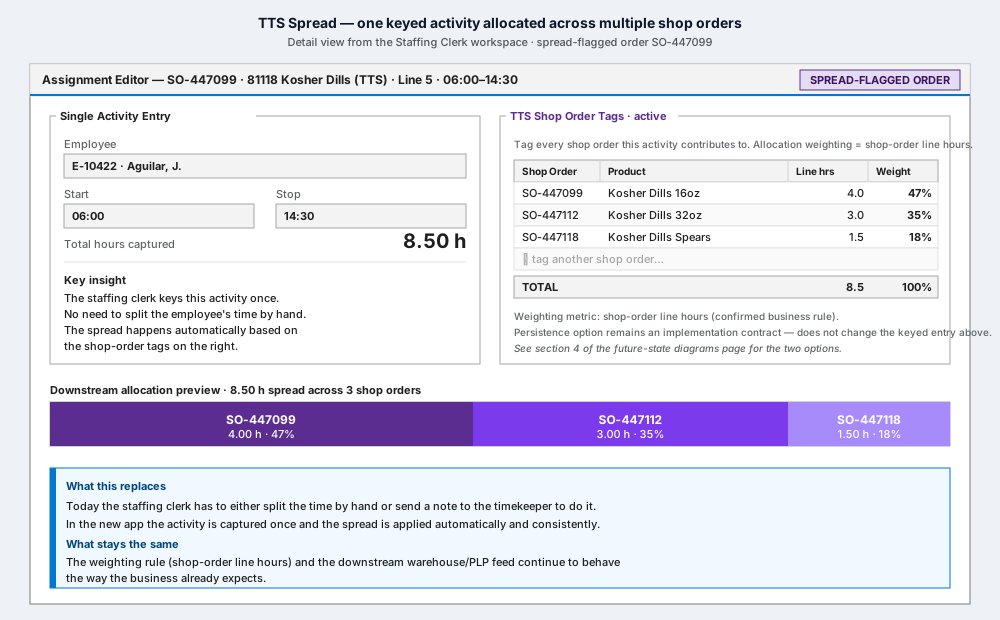
The Assignment Editor for SO-447099 opens. Because this is a TTS order, the TTS Shop Order Tags panel is the primary control on the right — and the single-activity entry on the left handles the rest.
What's on screen
- Left · Single Activity Entry. Maria selects the employee (E-10422 · J. Aguilar) and confirms the time window (06:00–14:30 — full shift). Total hours captured: 8.50 h. That's the only time entry she makes for this employee on this order.
- Right · TTS Shop Order Tags · active. This is where the spread is
captured.
- She tags the shop orders this activity contributes to:
SO-447099Kosher Dills 16oz — 4.0 line hoursSO-447112Kosher Dills 32oz — 3.0 line hoursSO-447118Kosher Dills Spears — 1.5 line hours
- The Weight column is computed in real time as a percentage of total line hours: 47%, 35%, 18%. Total: 100%.
- The order's own line-hour metric comes from the schedule data — Maria doesn't have to look it up.
- She tags the shop orders this activity contributes to:
- The app reminds her in small text: "Weighting metric: shop-order line hours (confirmed business rule)."
What Maria does not have to do
- Split the time herself. She doesn't enter 4.0 / 3.0 / 1.5 anywhere. She tags the shop orders; the line hours come from the schedule; the weights are derived.
- Run any allocation math. No mental arithmetic, no calculator, no spreadsheet, no follow-up email to timekeeping.
- Remember the weighting rule. It's labeled in the panel and applied consistently.
What the app does not do (yet)
- Persist the allocation. That's the open implementation contract — either the new database stores the computed spread rows, or the Mt Olive IT extract calculates the spread on the way out to the warehouse. Either way, the capture is the same: one activity, multiple shop-order tags, line-hour weighting.
⬅ Prev: Step 1 — Spot a spread-flagged order · Use Case Index · 🏠 Demo Home · ▶ Next: Step 3 — Allocation preview