

Solution Architecture
Audience · Anyone in the workshops who wants to know how the pieces fit together — IT, reporting observers, supervisors, timekeepers. No prior systems-architecture background required.
Tip · Click any diagram to open it full-screen at high resolution.
This page is a stakeholder-friendly walk through the phase-one solution architecture. It explains what the new application is, what it owns, what it does not own, and how it talks to the systems that stay in place.
For the design-level reference, the working wiki has a more technical "Future-State Solution Diagrams" page — this demo page is the same picture, in plain language.
The big picture
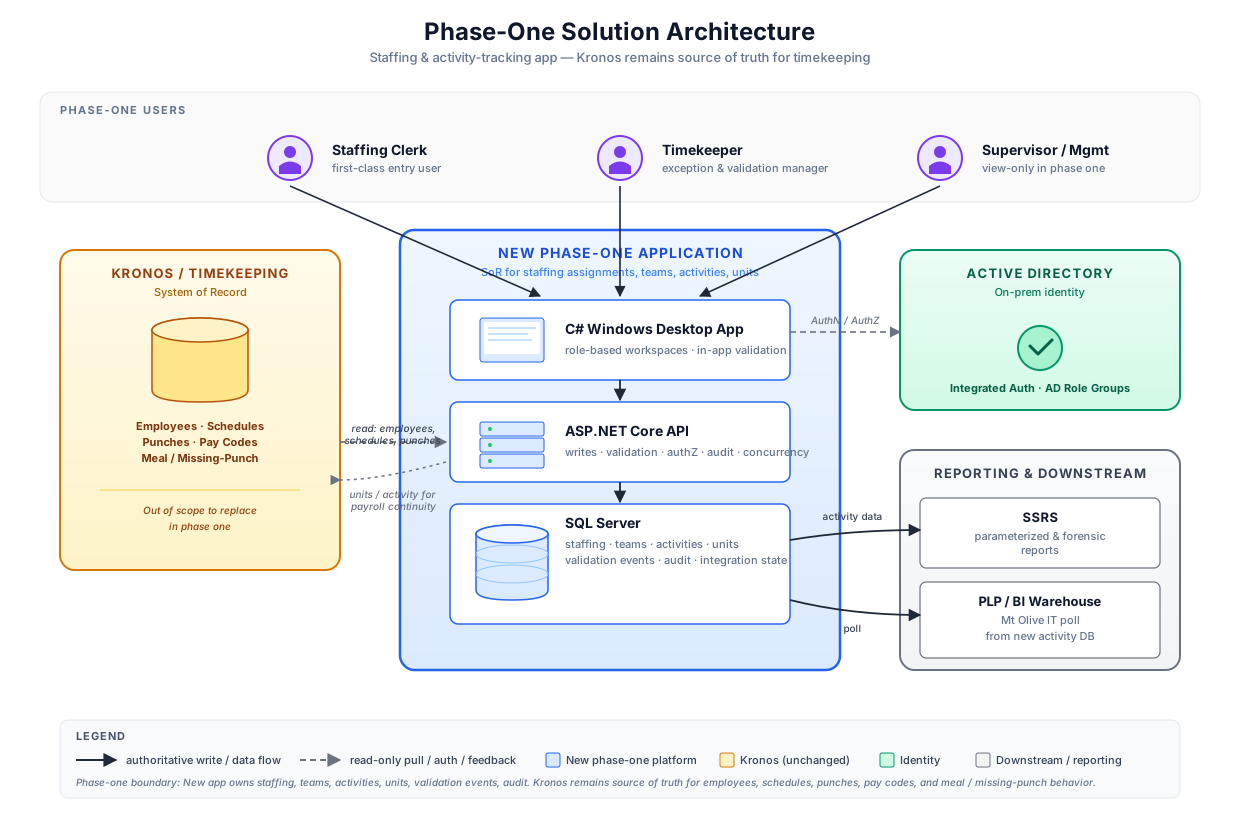
Three things to take from this diagram:
- Phase one is a new application, not a Kronos replacement. The blue box in the middle (the new C# desktop app, the API behind it, and the SQL Server it writes to) is what we are building. Kronos stays exactly where it is.
- Kronos remains the system of record for timekeeping. Employees, schedules, punches, pay codes, and meal/missing-punch behavior all stay on the existing timekeeping system. The new app reads from Kronos so it can validate against punches, and feeds back unit/activity data for payroll continuity. That is the only Kronos integration in phase one.
- Downstream reporting is unchanged in shape. SSRS continues to serve forensic/parameterized reports. The Mt Olive IT poll continues to feed PLP/BI. They just consume from a new source for the activity data: the new app's SQL Server instead of Kronos.
The new application stack
The new application is three layers that move together:
| Layer | What it is | What it does |
|---|---|---|
| C# Windows desktop app | The thing the staffing clerk, timekeeper, and supervisor open every day. Runs on existing Windows PCs and laptops. | Renders the role workspace. Calls the API. Shows live validation as the user edits. |
| ASP.NET Core API | The "single front door" for every write. Lives on a server inside the MTO network. | Enforces validation rules, authorization, concurrency, and audit. Talks to Kronos. Talks to SQL Server. |
| SQL Server | The new operational database. Lives alongside existing MTO databases. | Stores staffing assignments, team assignments, activities, units, validation events, and audit history. |
The arrows in the diagram go through the API on purpose. All writes go through one place. This is what makes audit, concurrency control, validation, and integrations consistent — nobody is hitting the database directly from the desktop.
What the new app owns vs what Kronos owns
This is the single most important boundary to understand. It is worth a slower look at the diagram and a slower read of the table.
| Business fact | Owned by | Notes |
|---|---|---|
| Employees (who is on payroll) | Kronos | Read by the new app. Not edited by the new app. |
| Schedules (who is expected when) | Kronos | Read by the new app to populate the staffing board. |
| Punches (in/out times) | Kronos | Read by the new app for validation. Never overwritten. |
| Pay codes, meals, missing punches | Kronos | Continue to be managed through existing timekeeping flows. |
| Staffing assignments | New app | Direct entry by the staffing clerk. |
| Teams (groupings of employees working an activity together) | New app | Created/edited by the staffing clerk. |
| Activity records (what work was done, when) | New app | The core data model of the new system. |
| Hand-packer unit counts (job 0055) | New app | Captured atomically with the activity. |
| Activity errors / validation events | New app | Surfaced in the timekeeper queue. |
| Audit trail (who changed what, when) | New app | Recorded by the API on every write. |
The principle behind the split: the new app owns the plan (who is assigned to what, and what activity was performed). Kronos continues to own the timekeeping fact (the punches). The new app reads the punches to validate the plan against reality. It does not edit the timekeeping fact.
Identity and authentication
The new app uses Windows Integrated Authentication against on-prem Active Directory. In plain terms: users sign in with their existing Windows credentials, same as they do for the file shares and the print servers today. There is no new password to remember.
Role membership comes from AD groups. The application maps AD groups to its own roles:
- AD group
MTO-Staffing-Clerks→ the staffing clerk workspace - AD group
MTO-Timekeepers→ the timekeeper workspace - AD group
MTO-Supervisors-3630→ the supervisor view for Dept 3630 - and so on, scoped by department / line / facility
If a user changes role, IT moves them to a different AD group; the app picks up the change at next login. There is no separate user administration screen for phase one.
Downstream reporting and integrations
The new app produces activity data that other systems consume. There are two consumers in phase one:
SSRS — forensic and parameterized reports
SSRS continues to be the right tool for printable, parameterized, forensic reports. The reports that today read from Kronos for activity data will be re-pointed at the new SQL Server. The report templates themselves do not need to be rebuilt.
Mt Olive IT poll to PLP / BI Warehouse
The downstream warehouse / PLP feed is polled by Mt Olive IT on a scheduled cycle. Today it polls Kronos activity data. After phase one it polls the new SQL Server. The shape of the data it consumes is compatible.
The supervisor dashboard checks the health of this poll and shows it as a tile (see UC3 · Step 2 — Read the KPIs).
The validation rule set, architecturally
The API enforces the validation rules. The desktop app shows them as the user edits, but the server is the authority. This means:
- A power user with a custom client cannot bypass validation.
- Bugs in the desktop app cannot corrupt data.
- The same rules apply whether the entry came from the staffing clerk workspace, a future bulk import, or anything else.
The rules in phase one are deliberately small:
| Outcome | Rule | What happens |
|---|---|---|
| Hard fail | Activity runs past the punch out time. | API rejects the write. User must fix before saving. |
| Hard fail | Two activities overlap for the same employee. | API rejects the write. |
| Warning | Punched time has a gap not covered by any activity. | API accepts the write; warning is recorded in the Activity Errors queue. |
| Pilot reject | New-app activity duplicates an existing legacy staffing-sheet activity (during pilot only). | API rejects the new entry; legacy wins. |
Walk through them in action in UC1 · Step 3 — Live validation and UC2 · Step 3 — Choose a fix.
TTS spread, architecturally
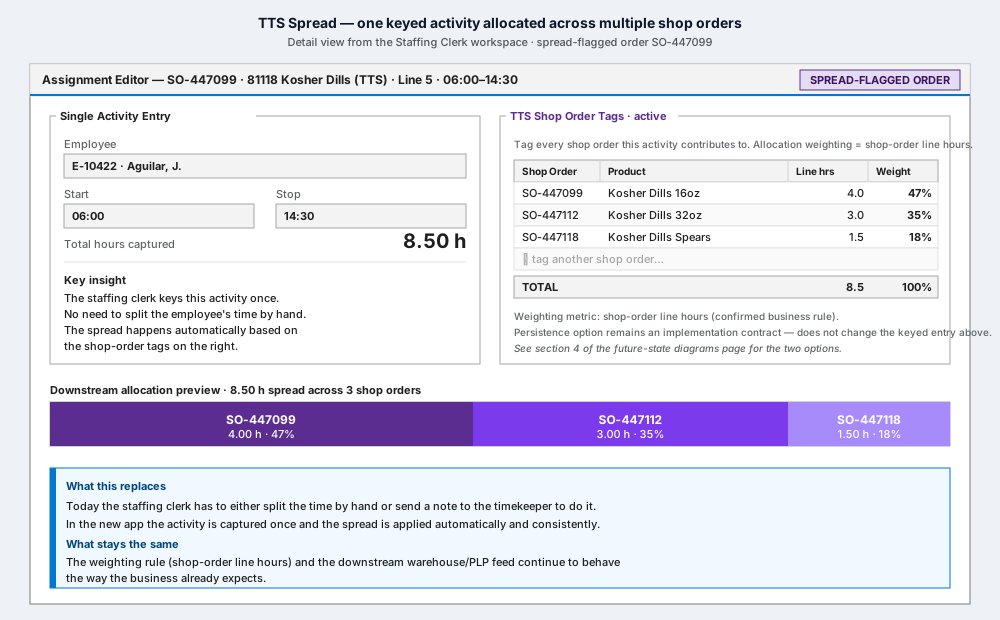
For spread-flagged shop orders ("TTS"), one employee activity is allocated across multiple shop orders, weighted by shop-order line hours. The staffing clerk keys one activity; the allocation is derived (see UC4 — TTS spread).
There is one open implementation contract for Ryan / IT awareness:
- Option A — persist the spread rows in the new SQL Server. The Mt Olive IT poll reads them as-is. The new database is self-describing for warehouse consumers.
- Option B — persist only the source detail (the keyed activity and the tagged shop orders). The Mt Olive IT extract calculates the spread on the way out to the warehouse. The new database stays minimal; the extract is doing the work.
Either option preserves the confirmed business behavior. The staffing clerk's experience is the same. Downstream warehouse data is the same. This is a decision about where the computation lives, not what it does.
Hand-packer units (job 0055), architecturally
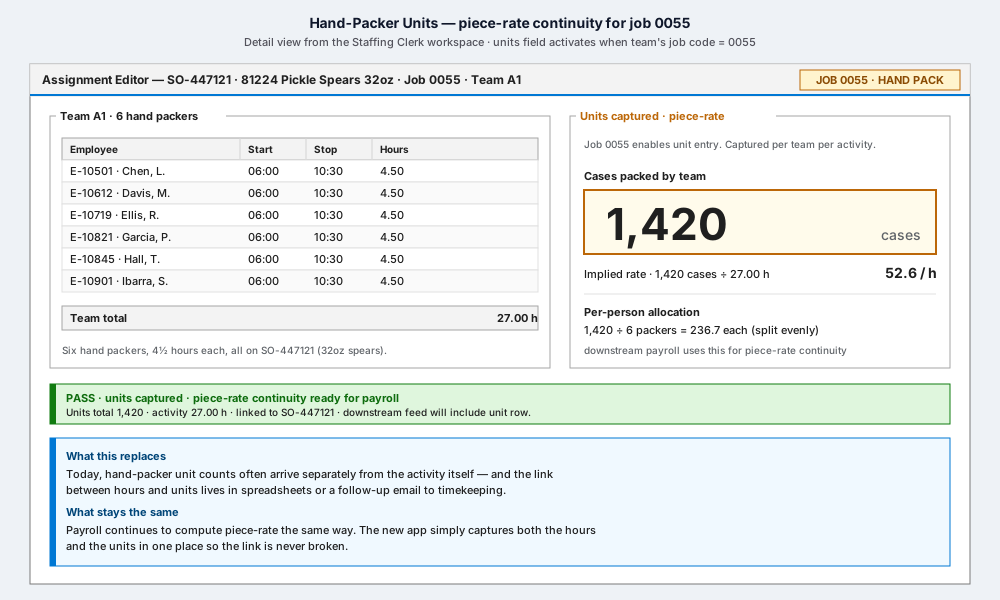
For piece-rate work on job 0055, the unit count is captured atomically with the activity — same record, same save, same audit event. This guarantees the link between hours and units never breaks, which is the single biggest risk in the current spreadsheet-based handoff. Walk through it in UC5 — Hand-packer units.
Pilot and rollback
The phase-one architecture is intentionally designed so rollback is trivial: if the pilot has to revert for an affected scope (a department, a line, a facility), users return to the existing staffing-sheet SOP for that scope. There is no data migration to undo and no Kronos schema to revert, because the new app does not write to Kronos.
During pilot, the legacy staffing sheet wins any duplicate conflict. This is enforced by the validation rule above ("Pilot reject"). It prevents the situation where two sources of truth disagree about what happened on a given day.
What this architecture is not
- Not a Kronos replacement. Kronos is bigger than phase one. The staffing-and-activity slice is what we are tackling first; the broader timekeeping platform is out of scope.
- Not cloud-hosted. Phase one runs on-prem against the on-prem AD, on-prem SQL Server, and on-prem report server. No cloud dependency.
- Not multi-tenant. Single MTO deployment.
- Not a UI framework decision. The mockups assume plain WPF with free open-source theming. No commercial component library is required for phase one; that is an optional future visual-polish decision.
Where to go from here
- For the product walkthrough, start at Demo Home.
- For the role-by-role workflows, jump into any use case from the home page.
- For technical design discussion with the development team, the working wiki has the data model sketches, integration contracts, and open-question register.
⬅ 🏠 Demo Home