

UC1 · Step 2 of 5 — Pick the short order and start assigning
Maria Rivera · Staffing Clerk · Dept 3630 / Line 5 · Tuesday, 06:00
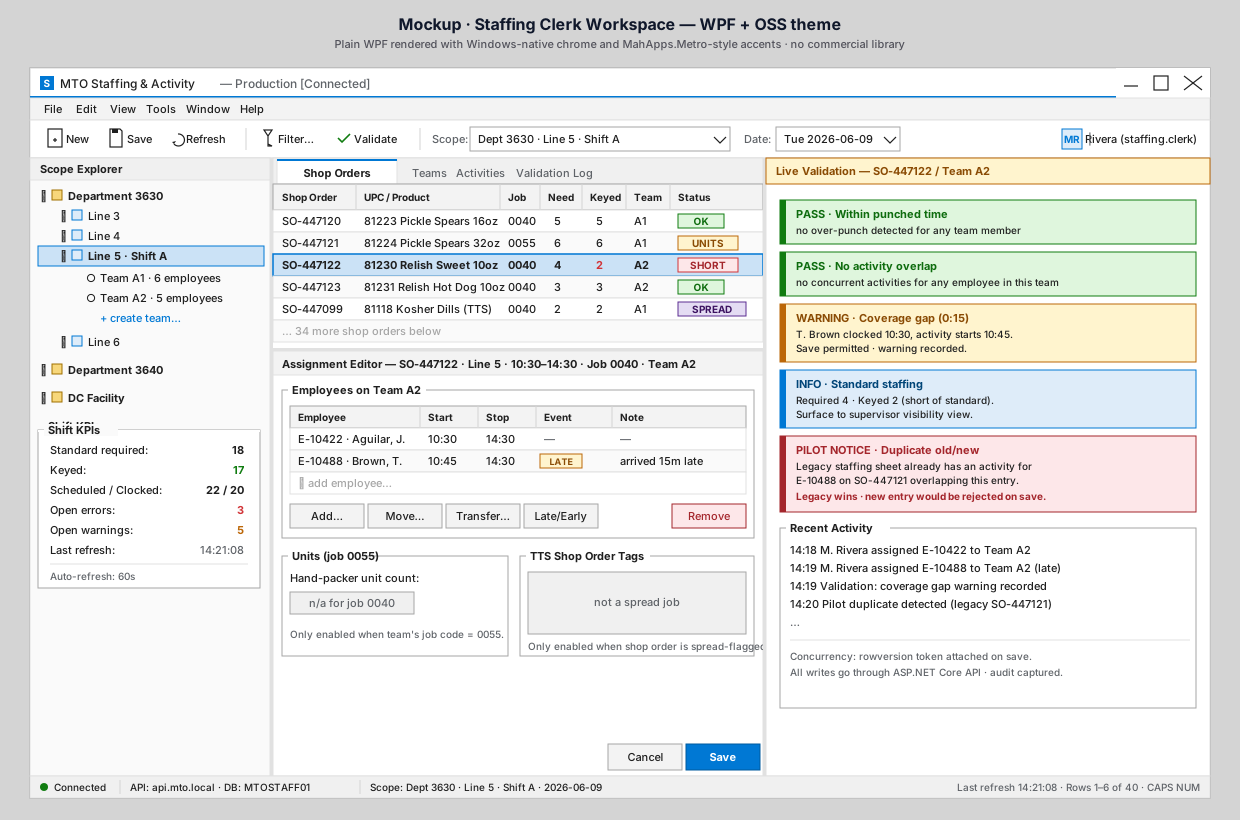
Maria looks at the list and spots SO-447122 — Relish Sweet 10oz in red.
The status says SHORT: it needs 4 employees and currently has 2 keyed. That
order runs 10:30–14:30, so she has time, but it's the priority for the next
few minutes. She clicks the row.
What to notice
- The selected row (
SO-447122) is highlighted in blue at the top of the list. The Assignment Editor opens below the list, scoped to that order: shop order number, product, line, time window, job code, and the team it's pointed at (Team A2). - The Employees on Team A2 group shows who is already assigned: J.
Aguilar (10:30–14:30) and T. Brown (10:45–14:30, flagged
LATEwith the note "arrived 15m late"). TheLATEbadge is informational; Maria can still assign Brown. - The Units (job 0055) and TTS Shop Order Tags group boxes both show "n/a" — this order is job 0040 and isn't spread-flagged, so neither feature applies. They light up automatically when needed (see UC4 and UC5).
- The toolbar shows the contextual actions Maria can take: Add…, Move…, Transfer…, Late/Early event capture, and a red Remove button for un-assigning.
What Maria does
She uses the search field at the bottom of the team grid to find two more hand packers who are clocked in but unassigned. The app pulls candidates from the Kronos punch read (it knows who is on the clock) and from the unassigned-employee list for this line.
She adds them to Team A2 with the 10:30–14:30 window. The grid grows from 2 rows to 4.
Why it matters
Maria isn't typing free-form text on a paper sheet. She's making a decision inside a workspace that already knows the order, the team, the time window, and who is clocked in. The app holds the context so she can focus on the choice.
⬅ Prev: Step 1 — Open your scope · Use Case Index · 🏠 Demo Home · ▶ Next: Step 3 — Live validation